RLanguageAssistant+
FiveM written RP assistant

RLanguage Assistant+

A desktop overlay that translates written roleplay chat in real time, keeps slang and context natural, and unlocks faster writing tools for Pro members.

Browse the site freely. An account is only needed for Pro checkout or Pro login inside the app.

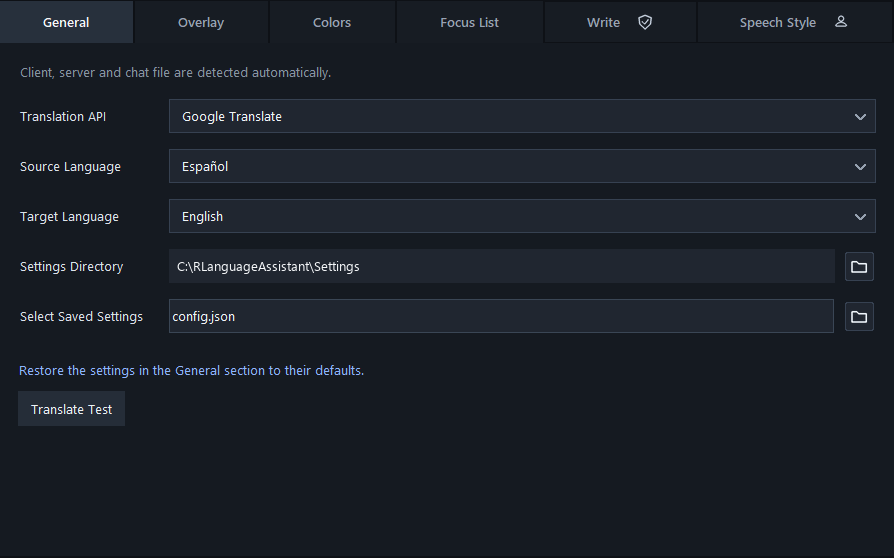
RLA+ General app section
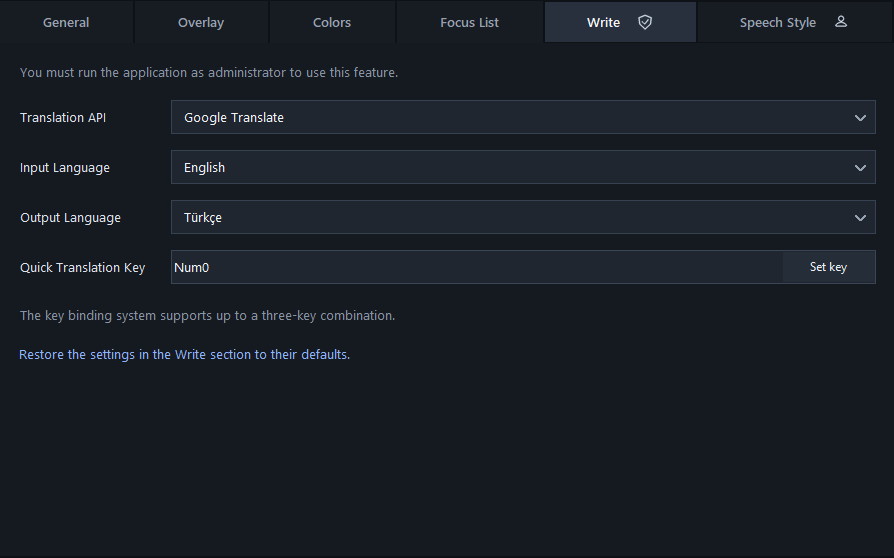
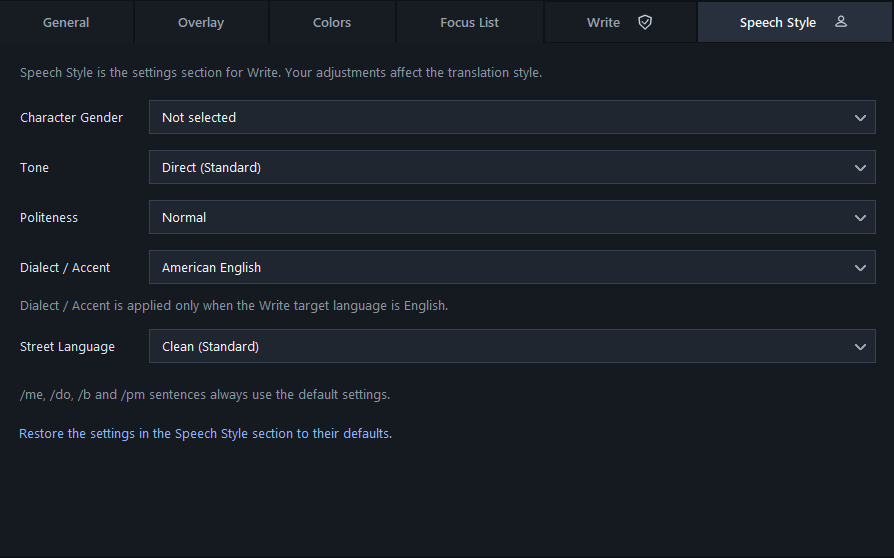
RLA+ Write app sectionRLA+ Speech Style app section

Free version

The free app is still useful on its own: it focuses on live written RP translation and the overlay experience.

  • Real-time overlay for player chat and useful server messages.
  • Context-aware translation for RP phrasing, slang and common server language.
Pro version

Pro is for players who also want to write faster and make their target-language output sound like their character.

  • Write: translate what you type in chat before sending it.
  • Speech Style: tune character gender, tone, politeness, dialect/accent and street language.

Next expansion

Voice -> Text -> Translation is planned after the written RP product is stable. The current architecture keeps that path open without forcing voice features into the first paid release.

  • Speech recognition
  • Voice translation
  • Optional translated voice output
Real app screens

See the desktop app before signing up

The homepage stays open to everyone. These are direct captures from the current RLA+ Windows app, so visitors can inspect the real interface first.

RLA+ General section screenshot

General

Automatic FiveM detection, translation provider and live overlay language choices.

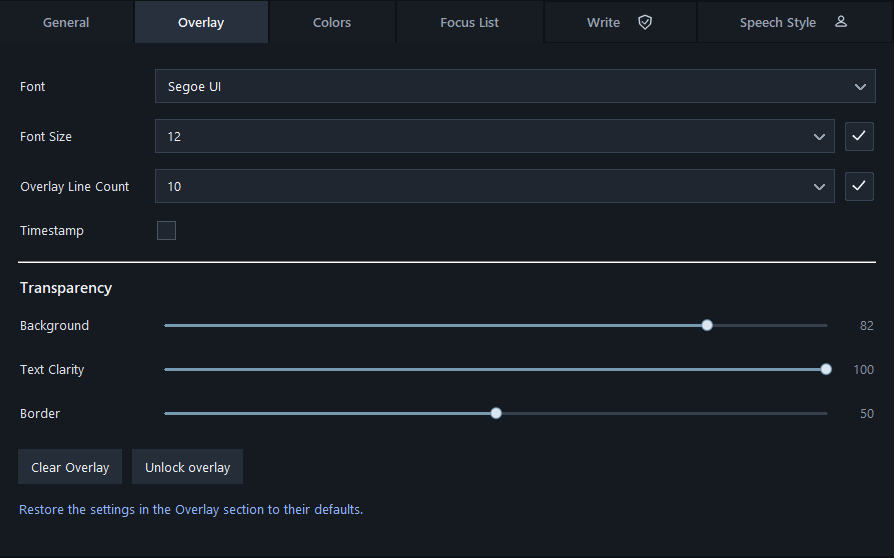
RLA+ Overlay section screenshot

Overlay

Font, line count, transparency and locked overlay controls for written RP chat.

RLA+ Write section screenshot

Write

Pro writing hotkey, input language and output language for translating before sending.

RLA+ Speech Style section screenshot

Speech Style

Pro style controls for gender, tone, politeness, dialect/accent and street language.

Windows package

Download RLA+ for free

The current package includes the Windows app and a TXT user guide. People can install it, explore the live overlay, and decide later whether they need Pro.

Download RLA+

Free users can browse the site and download the app without creating an account. Write and Speech Style unlock after an active Pro subscription.

RLanguageAssistant.zip

Includes the app and a TXT user guide.

Free

Free version

The free app is still useful on its own: it focuses on live written RP translation and the overlay experience.

  • Real-time overlay for player chat and useful server messages.
  • Context-aware translation for RP phrasing, slang and common server language.
  • FiveM-first workflow without server statistics or unrelated panels.
  • Noise filtering so technical client messages do not crowd the overlay.
Pro

Pro version

Pro is for players who also want to write faster and make their target-language output sound like their character.

  • Write: translate what you type in chat before sending it.
  • Speech Style: tune character gender, tone, politeness, dialect/accent and street language.
  • Account-based Pro access across updates, with one active Pro device per seat.
  • Short-lived license checks so Pro features cannot be copied by sharing the app folder.
Plans

Plans

People can install the app for free. Write and Speech Style unlock after an active Pro subscription is found on the account.

Payments open in a secure checkout. RLA+ does not store card numbers.

Checkout links are ready to be connected after the payment provider account is created.

Monthly

1 month

$5/ 1 month

Yearly

1 year

Best value
$49/ 1 year

How money reaches your bank

Card and wallet payments should be handled by a payment provider, not by the RLA+ website directly.

  1. 1You create a seller account with Paddle or Lemon Squeezy and verify your identity/business.
  2. 2You add your bank account in that provider dashboard.
  3. 3The customer pays by card or supported wallet in the provider checkout.
  4. 4The provider confirms payment through a webhook, and RLA+ marks the account as Pro.
  5. 5The provider pays out the collected money to your bank based on its payout schedule.

Account flow

Users create an account, verify email, subscribe, then sign in from the desktop app to unlock Pro.

Create account

Use email, Google, Discord or email/password.

Verify email

Verification and reset codes are sent by email.

Unlock Pro

The desktop app checks the account and opens Pro features.

Name
Email
Password
rplanguage.com

rplanguage.com launch path

The site can move to your own domain after the domain is purchased and connected to the hosting provider.

1

Buy rplanguage.com from a domain registrar.

2

Connect the domain to the final hosting account and add the DNS records it provides.

3

Set the public site URL to https://rplanguage.com before launch.

4

Update Google, Discord, email and payment return URLs to use the new domain.

5

Wait for DNS and SSL to finish, then test sign-in, checkout and download links.

Owner only

Owner Pro grants

You should have a protected owner panel for upgrading your own account or a friend/customer account to Pro without payment.

Search the account by email.

Grant monthly, yearly or custom complimentary Pro time.

Store who granted it, why, when it expires and whether it was revoked.

Keep normal users away from this panel; it is owner-only.

Pro protection model

Pro protection model

The safest MVP is account-based access, not reusable activation codes. Codes can still be used for email verification, but Pro should live on the account.

One active device

Each Pro seat keeps one active desktop session. A second login can either block or replace the older session.

Short license windows

The app receives a signed Pro token that expires quickly and refreshes with the server.

Server-side decisions

Write and Speech Style are enabled only after the server confirms an active subscription.

Practical anti-sharing

Device id, session heartbeat and suspicious-use limits make casual account sharing annoying and visible.